Love Dog Canva Frame: Your Creative Pet Paw Print Template
In the world of digital design, finding assets that are both emotionally resonant and technically easy to use can be a challenge. Whether you are a small business owner creating merchandise, a blogger designing social media posts, or a crafter making personalized gifts, the visual language of pets—specifically the timeless appeal of dogs and cats—connects instantly with audiences. The Love Dog Canva Frame Cat Dog Paw Print template offers a specific solution for this niche. It is not merely a static image; it is a flexible design asset built within Canva, allowing you to integrate your own photography and graphics into a pre-designed aesthetic. This article explores how to maximize this template, ensuring your final output looks professional, regardless of your design experience.
Understanding the Asset: More Than Just a Graphic
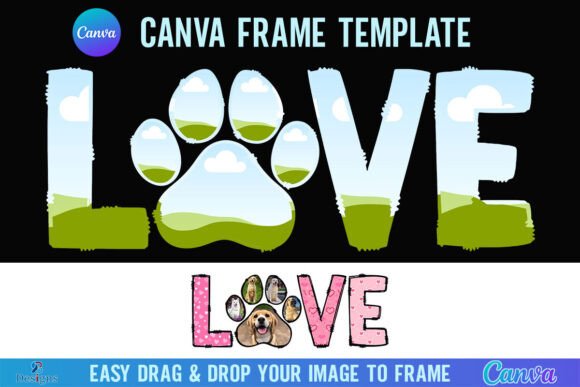
At its core, the Love Dog Canva Frame Cat Dog Paw Print is a digital frame template designed to showcase imagery within a thematic border. The visual style revolves around the motifs of animal affection—specifically paw prints and heart shapes. These elements are woven together to create a border that is playful yet structured. The aesthetic leans towards a modern, clean look, avoiding overly cluttered backgrounds so that the central image remains the focal point. The "personality" of the frame is warm, inviting, and nostalgic, making it ideal for content that aims to evoke an emotional response.
Technically, this is delivered as a digital product. You will receive a ZIP file containing a PDF. This PDF contains a direct link to the Canva template. It is crucial to understand the file specifications to manage your workflow expectations. The canvas size is set at a generous 4000x4000 pixels. This high resolution is vital for versatility. It ensures that the design is sharp enough for web use but, more importantly, it provides the necessary density for print projects. Whether you are printing a large poster or a small sticker, the 4000px dimension prevents pixelation, maintaining the crispness of the paw print details.
The Technical Reality: Canva and File Formats
A common point of confusion for many users is the distinction between a Canva template and a vector file like an SVG. The Love Dog Canva Frame is strictly a Canva Frame Template. This means it is optimized for the Canva ecosystem. To use it, you need a FREE Canva account. The workflow is designed to be intuitive: once you access the template via the link, you simply drag and drop your own PNG or JPG background image into the frame. The frame automatically masks the image, fitting it perfectly into the paw print design.
However, there are limitations to consider based on your software stack. This file is not an SVG and is not suitable for use with Cricut Design Space or Silhouette cutting machines. If your workflow involves physical die-cutting where you need to trace the outline of the frame to cut around it, this specific digital file will not function as a cut file. It is designed for digital composition and print-on-demand (like posters or mugs), not for physical die-cutting templates. Furthermore, if your goal is to download the final design with a transparent background to overlay onto other complex graphics in software like Photoshop, you will need a Canva Pro version or higher. The free version of Canva typically forces a white background upon export for PNGs unless you have the Pro subscription.
Strategic Applications for Creators and Businesses
The utility of the Love Dog Canva Frame extends across various industries. For pet photographers, this frame serves as an excellent add-on product. Instead of just delivering a digital file, you can offer clients a "framed" version of their favorite pet photo, ready for them to share on social media. This adds value to your service with minimal effort on your part.
For entrepreneurs and small business owners, specifically those in the pet care industry—groomers, dog walkers, or boutique pet food brands—this template is a branding workhorse. You can use it to create consistent visual content for Instagram or Facebook. By placing promotional images or product shots inside the paw print frame, you create a recognizable visual language. This helps in building brand identity without the need for expensive custom illustration. The frame acts as a cohesive element, tying disparate posts together into a unified feed.
Publishing and Editorial Use
In the realm of editorial design, such as newsletters or blog headers, the frame can be used to highlight specific content. For instance, a "Pet of the Week" feature in a local newspaper or a community newsletter can be instantly elevated by placing the animal's photo inside this specific frame. It signals to the reader immediately what the content is about, aiding in visual hierarchy. The paw prints guide the eye inward toward the subject matter, improving readability and engagement.
Crafters and hobbyists also find immense value here. While you cannot use this for Cricut cutting, you can use it for digital scrapbooking or creating printables. Imagine creating a memorial page for a beloved pet or designing a custom phone wallpaper. The high-resolution 4000x4000 px canvas ensures that even if you zoom in or crop the image for a phone screen, the details remain sharp.
Design Principles: Maximizing Visual Impact
When working with the Love Dog Canva Frame, the principles of modern typography and composition still apply, even though this is a graphic frame rather than a font. The frame is the "display" element—it catches the eye. Therefore, the image you place inside acts as the "body" content. You need to ensure there is enough contrast between the frame and your image.
For example, if the frame features dark paw prints, placing a very dark photo inside might make the design look muddy. Conversely, a high-contrast image—like a bright white dog against a green grass background—will pop beautifully within the border. This attention to contrast influences brand perception. A well-composed, high-contrast image suggests professionalism and care, whereas a poorly fitted or low-quality image can make a brand look amateurish, regardless of how nice the frame is.
Font Pairing and Typography Strategy
Since this asset is a frame, you will likely need to add text to your design. This is where font pairing becomes critical. The Love Dog frame has a distinct style—playful and organic. Therefore, you should avoid rigid, ultra-corporate fonts like strict sans-serifs (e.g., Arial or Helvetica) which might clash with the whimsical nature of the paw prints.
- Serif and Sans Serif Balance: If you want a modern look, pair the frame with a clean, rounded sans serif font. This maintains readability while complementing the soft curves of the paw prints.
- Script and Handwritten Styles: For a more personal touch, such as a "Happy Birthday" message for a dog, a script font or handwritten font works well. However, ensure the script is legible. Overly swirly scripts can get lost against the texture of the frame border.
- Visual Hierarchy: Use the frame to draw attention, but use your typography to deliver the message. Keep text overlays simple. If you are overlaying text on top of the frame border, ensure the text color contrasts strongly with the frame's color palette.
When adding text, think about the readability. If you are creating a social media graphic, the text needs to be legible on a small mobile screen. Avoid placing critical information directly over the busiest parts of the paw print pattern. Instead, use the cleaner areas of the frame or place text inside the central image area if the background is simple enough.
Practical Workflow and Licensing Considerations
Integrating the Love Dog Canva Frame into your workflow is straightforward, provided you follow the steps. After unzipping the file and clicking the PDF link, the template opens in your Canva editor. You do not need to install any software; it runs in your browser.
- Access: Click the link in the PDF to open the template in Canva.
- Customize: Upload your own images to the Canva library. Drag these images onto the frame. Canva’s "Smart Mask" feature will automatically fill the frame.
- Edit: Adjust the position of your photo within the frame by double-clicking the image and dragging it.
- Export: Download your finished design as a JPG (for web/social) or PNG (for print or transparency needs).
Regarding commercial use: As a design asset, this frame allows you to create end products. For example, if you are a graphic designer, you can use this frame to create a logo variation or a social media post for a client. However, you cannot resell the raw Canva template file itself to others. The value lies in the customization. You are buying the convenience of the pre-made layout.
The Love Dog Canva Frame Cat Dog Paw Print is a versatile tool for the modern creator. It bridges the gap between professional design and personal sentiment. By understanding its technical specifications—such as the 4000x4000 px resolution and the Canva ecosystem requirements—you can avoid pitfalls like pixelation or software incompatibility. Whether you are using it for a commercial pet brand or a personal memorial project, the frame provides a strong visual foundation that enhances your content and engages your audience.